Upload and modify listing modules via Excel
Feature Introduction: The Excel Upload Batch Modify Listing Module feature allows users to enter the corresponding Module name in the listing template and upload the Excel file back to the system to batch replace listing module content. Currently, the supported modules include: Compatibility Module and Excluded List Module.
With this feature, when automotive compatibility information or excluded shipping location rules need to be updated, users only need to modify the corresponding Module settings and upload the Excel file. The updated module content can then be quickly applied to related profile or listings in bulk, significantly reducing manual modification efforts and improving listing maintenance efficiency.
Notes
- The Module site or category entered must match the listing being modified; otherwise, the modification will fail.
- Please do not modify the related Module content before the batch modification task is completed, as this may result in data errors or modification failure.
Steps
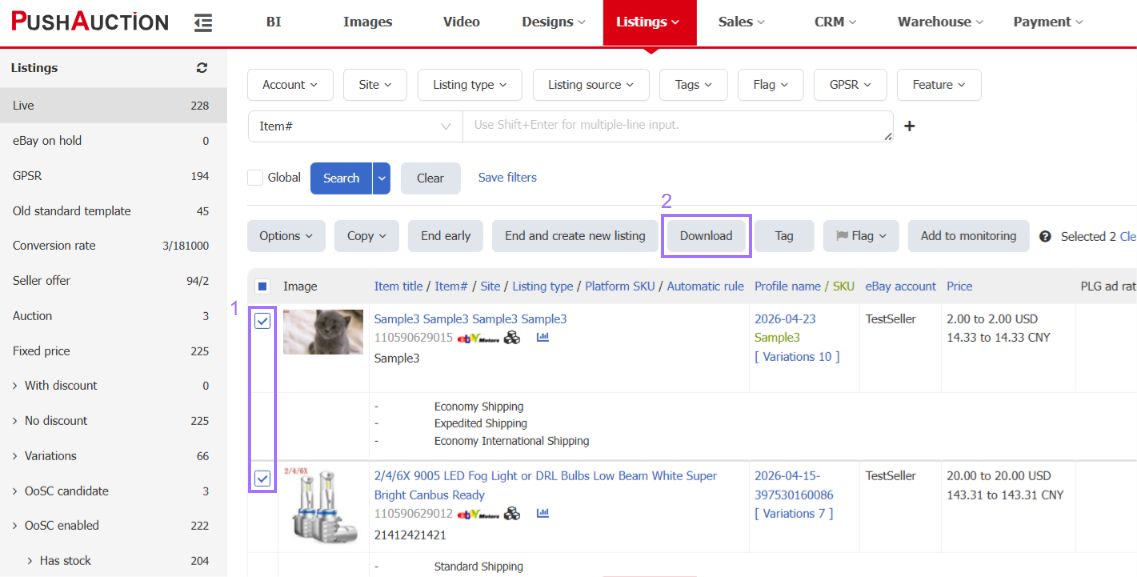
Step 1: Select the listings you want to modify > Click 【Download】
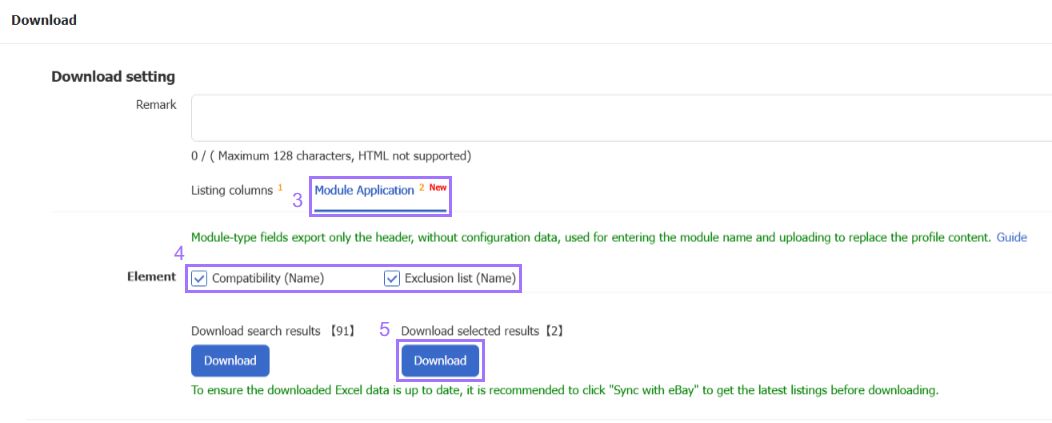
Step 2: In the download window, switch to the "Module application" tab > Select the Module fields to be replaced > Click 【Download】
Tip: You can select fields under both "Listing columns" and "Module application" at the same time to modify both types of information in one operation.
Step 3: Enter the correct Module name in the Excel file

Step 4: Upload the modified Excel file back to the system

For Module creation tutorials, please refer to the following links:
How to Create a Compatibility Module
How to Create an Excluded List Module
How to Create a Compatibility Module
How to Create an Excluded List Module
Article Number: 2050
Author: Thu, Sep 10, 2026
Last Updated: Sat, Sep 12, 2026
Online URL: https://kb.pushauction.com/article.php?id=2050