Message templates
Message Templates allow you to save commonly used replies—such as greetings, product details, and post-sale responses as templates. Tags can be inserted for details that change per order. Upon sending, the system automatically replaces these tags with real data to enable efficient communication.
There are some system message template in [Setting] > [CS setting] > [Message template] > [System template] for use.Besides, users can add custom template if needed.The message template can be used to set auto messages and reply eBay messages.
Add custom templates
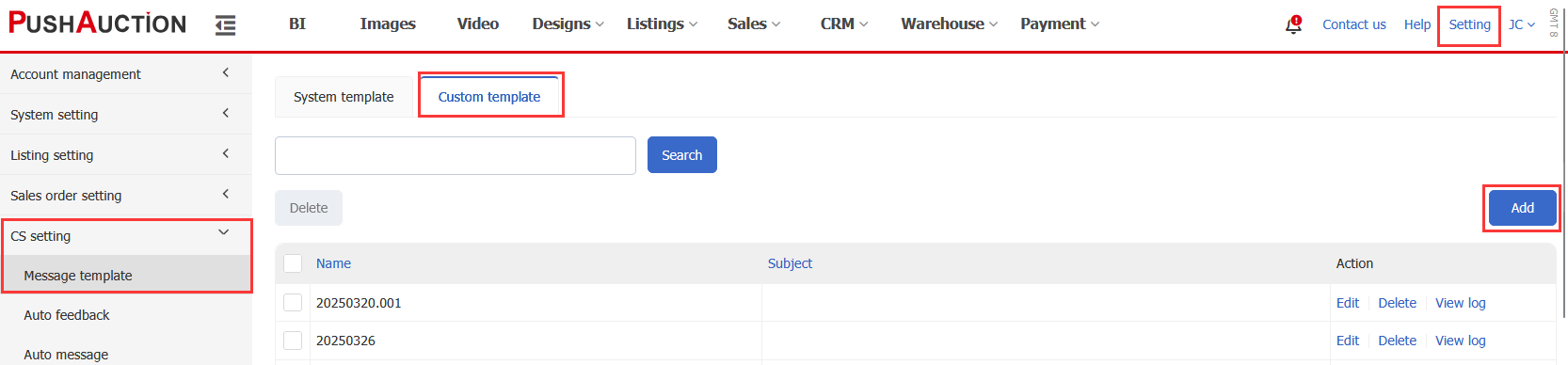
Step 1: Click [Setting] > [CS setting] > [Message template] > [Custom template] > [Add];
Step 2: Input template name,subject,body > Click [Save].
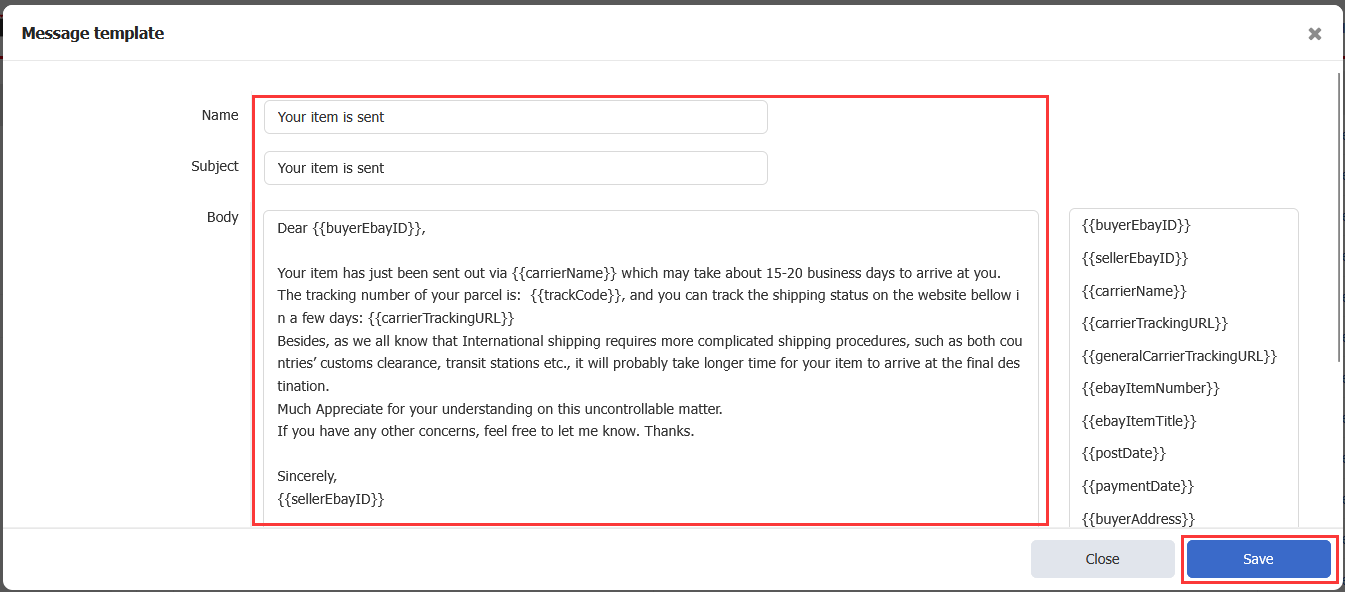
Note: System would replace the text tags with related info in auto messages.Select tag(s) inserting in content or subject if needed.
| Label Name | Description |
| {{buyerEbayID}} | Buyer's eBay Username |
| {{sellerEBayID}} | Seller's eBay Account |
| {{carrierName}} | Carrier Name from the order |
| {{CarrierTrackingURL}} | Carrier's Package Tracking URL |
| {{generalCarrierTrackingURL}} | Universal Carrier Tracking URL: https://www.17track.net/en |
| {{ebayItemNumber}} | eBay Item Number |
| {{ebayItemTitle}} | eBay Item Title |
| {{postDate}} | Shipping Date / Dispatch Date |
| {{paymentDate}} | Payment Date |
| {{buyerAddress}} | Recipient Address / Shipping Address |
| {{today}} | Local Date when the message is sent |
| {{trackCode}} | Tracking Number |
| {{receivedAmount}} | Total Payment Received for a Transaction |
| {{itemLink}} | Item Number Link |
| {{ebayVariations}} | Selected Variations / Styles (from the order) |
Example: Set one message template about purchase notice to buyers.
Subject: Congratulations! You have just won the item.
Content:
Dear {{buyerEbayID}},
Congratulations! You have just won the item.
eBay item number: {{ebayItemNumber}}
Item title: {{ebayItemTitle}}
We will dispatch this item upon your full and cleared payment.
Thank you,
{{sellerEBayID}}
Article Number: 486
Author: Sat, May 21, 2016
Last Updated: Fri, Oct 24, 2025
Online URL: https://kb.pushauction.com/article.php?id=486